
That 'Microsoft' pop-up is fake: what to do right now
That pop-up warning is fake. Do not call the number. A plain guide for older adults: how to close it safely, what to do next, and how to prevent it.
Read articlePersonal Security
AnyDesk, TeamViewer, and ScreenConnect are real tools scammers misuse. Learn how the refund scam works, warning signs, and how to protect your family.
AnyDesk, TeamViewer, and ScreenConnect are real, useful programs. IT helpers use them every day to fix computers without driving to your home. The programs let one person see and control another person's screen from anywhere. Scammers have learned to misuse the same tools. They talk people into running them, then use the connection to reach bank accounts.
This article explains how the scam works, what to watch for, and what to do.
When someone accesses your computer remotely, they can see your screen. They can move your mouse, open files, and type — as if they were sitting right in front of it.
A real IT helper uses this to diagnose problems and apply fixes without leaving their desk. That is a legitimate service. Many families use it to get help from a son, daughter, or IT provider they trust.
The danger is that the same capability works for anyone you let in. Once you run one of these programs and share a code with a stranger, that stranger has full control of your computer.
The Cybersecurity and Infrastructure Security Agency (CISA) describes this pattern in Advisory AA23-025A.
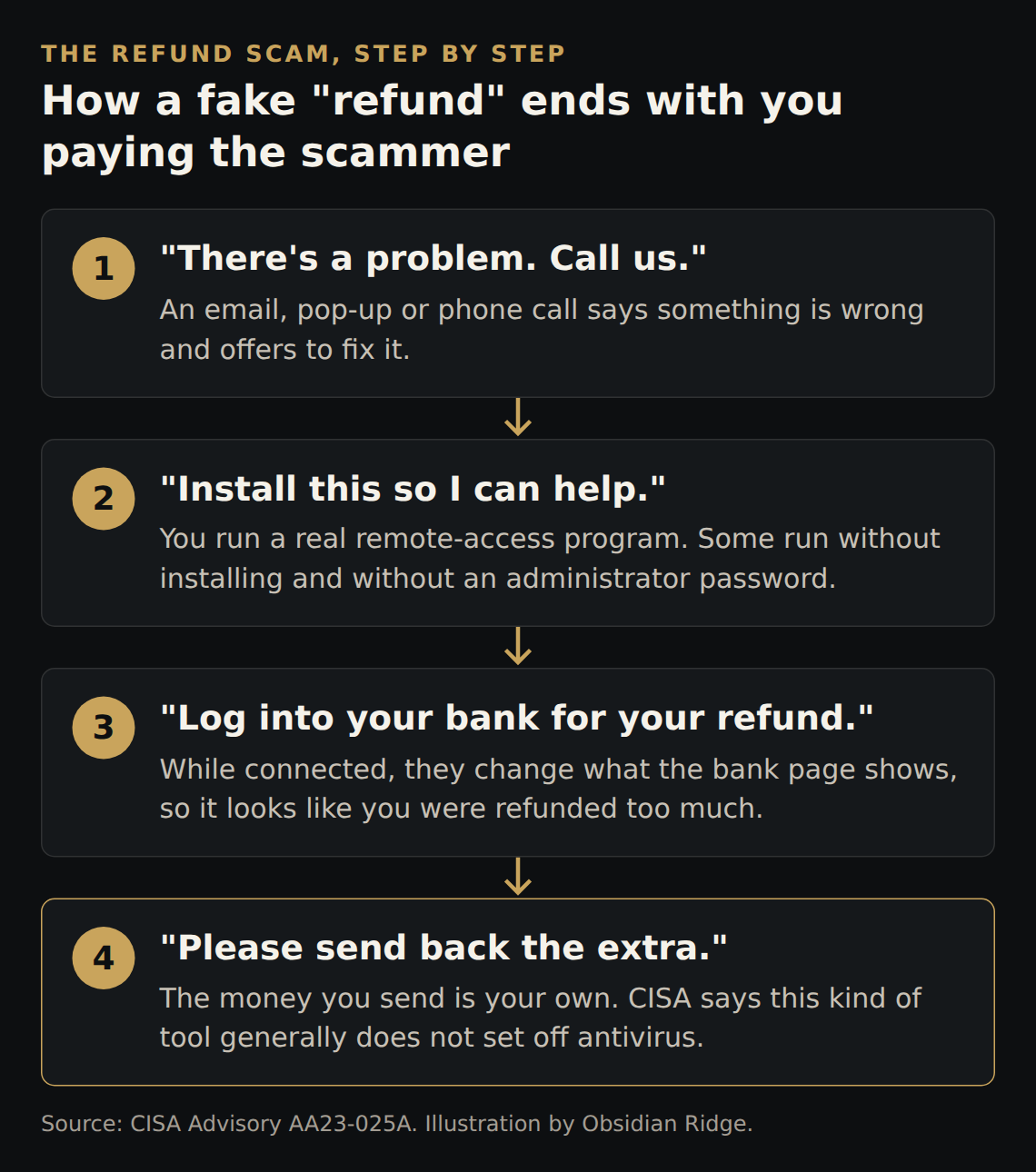
Step 1: You get a message or a call. In the campaign CISA describes, it started with an email that looked like it came from a help desk. Some emails had a link. Others asked people to call a phone number. Other versions of this scam start with a pop-up or a phone call. Each one says there is a problem and offers to fix it.
Step 2: "Install this so I can help." The person directing you — or a link in the message — tells you to download and run a remote-access program. CISA notes that some versions of these programs run without a full installation and without requiring administrator permission. That means your computer may not ask you for a password or show a security warning before the program starts.
Step 3: Log into your bank for a "refund." CISA describes this as a refund scam. While still connected, the scammer asks you to log into your bank account. Then they use the remote tool to change what the bank page shows, so it looks as if you were refunded too much. They ask you to send the "extra" back. The money you send is your own.
Step 4: No alarm goes off. CISA states: "The use of RMM software generally does not trigger antivirus or antimalware defenses." Your security software may show nothing at all. CISA also notes that criminals can misuse any legitimate remote-access program. The programs themselves are not the problem.
CISA identified a widespread campaign in October 2022 in which help-desk-themed emails led people to download ScreenConnect and AnyDesk for exactly this purpose.
The FBI's Internet Crime Complaint Center (IC3) reported that in 2025, people aged 60 and over filed more than 21,000 complaints related to tech and customer support scams, with losses of more than $1 billion. Those figures come from the 2025 IC3 Annual Report. You can report fraud at ic3.gov.
If you think this is happening or has already happened, act now.
One rule to agree on. Never let anyone you did not call yourself connect to your computer. If someone contacts you first, by phone, email or pop-up, and offers help, that is the warning sign. A real company will not mind if you hang up and call back on a number you already have.
Check your computer for remote-access programs you do not recognize.
On a Windows computer, open Settings and go to Apps (on some versions it appears as "Apps & features"). Scroll through the list. Look for anything with a name like AnyDesk, TeamViewer, ScreenConnect, or any name containing the words "remote," "assist," or "support" that you do not remember installing. If you see something unfamiliar, do not open it. Ask a trusted person to look at it with you before removing anything.
On a Mac, open Finder and go to the Applications folder. Scroll through and look for the same kinds of names. Again, if you find something you do not recognize, ask a trusted person before taking action.
A program a trusted person set up on purpose is fine. If a family member or an IT provider you hired installed a remote-access program so they can help when something goes wrong, that program is not a danger. You should know it is there, know who uses it, and have agreed to it. The risk is a program you did not ask for, installed because a stranger told you to.
Talk to family members now, before a scam happens. A short conversation is the best prevention: agree together that no one will ever let an unexpected caller or message take control of their computer, and that anyone who gets a suspicious pop-up or call will contact a family member first before clicking anything. The printable fridge card puts that rule, and a family member's number, next to the computer.
Ridge Watch is managed monitoring for home computers. Analysts in a 24/7 security operations centre review every alert and take action — they remediate it, note it, or isolate the computer from the network to contain a threat. Taking a computer offline is one of those three outcomes, not what happens every time. A contained computer stays offline until we review it, within one business day.
Blocking remote-control tools from running in the first place is coming soon, Windows Pro only.
Ridge Watch works on Windows and Mac computers.
What Ridge Watch cannot stop. It cannot stop a phone call, or someone being talked into paying. That includes handing over gift cards, wiring money, using cryptocurrency, or logging into a bank to process a "refund." A remote-access tool that someone lets in on purpose may not look like an attack — CISA confirms these tools generally do not trigger antivirus defenses, so it may not raise an alert. Phones and tablets are not covered.
Last updated
September 28, 2026. We refresh this content as the threat landscape and tools evolve.
FAQ
A remote-access scam is when a criminal contacts you — by phone, email, or pop-up — pretending to offer tech or refund help, then talks you into running a legitimate program like AnyDesk, TeamViewer, or ScreenConnect.
Once connected, they can see and control your screen. In the version CISA describes, they ask you to log into your bank for a “refund” while they are connected.
Not reliably. CISA states that the use of remote monitoring and management software generally does not trigger antivirus or antimalware defenses, because the programs themselves are legitimate tools.
Disconnect from the internet immediately, close the program or shut the computer down, and call your bank from the number on your card. Report the incident to the FBI at ic3.gov.
Related reading
That pop-up warning is fake. Do not call the number. A plain guide for older adults: how to close it safely, what to do next, and how to prevent it.
Read articleA calm, numbered checklist for families: cut the internet, call the bank, change passwords from a clean device, report it. Steps for the first hour.
Read articleA plain-English guide to the scams hitting older adults hardest in 2026, and the single response rule that prevents most of the losses.
Read article