How Scammers Abuse Remote-Access Tools Like AnyDesk and TeamViewer
AnyDesk, TeamViewer, and ScreenConnect are real tools scammers misuse. Learn how the refund scam works, warning signs, and how to protect your family.
Read article Obsidian Ridge
Personal Security
A calm, numbered checklist for families: cut the internet, call the bank, change passwords from a clean device, report it. Steps for the first hour.
If a scammer just had remote access to your parent's computer, do this first: cut the internet connection, stop all contact with the caller, and change the most important passwords from a different device. The six steps below cover the first hour.
Work through these in order. Do not skip ahead. Steps 4, 5, and 6 must be done from a clean device — not the computer the scammer used.
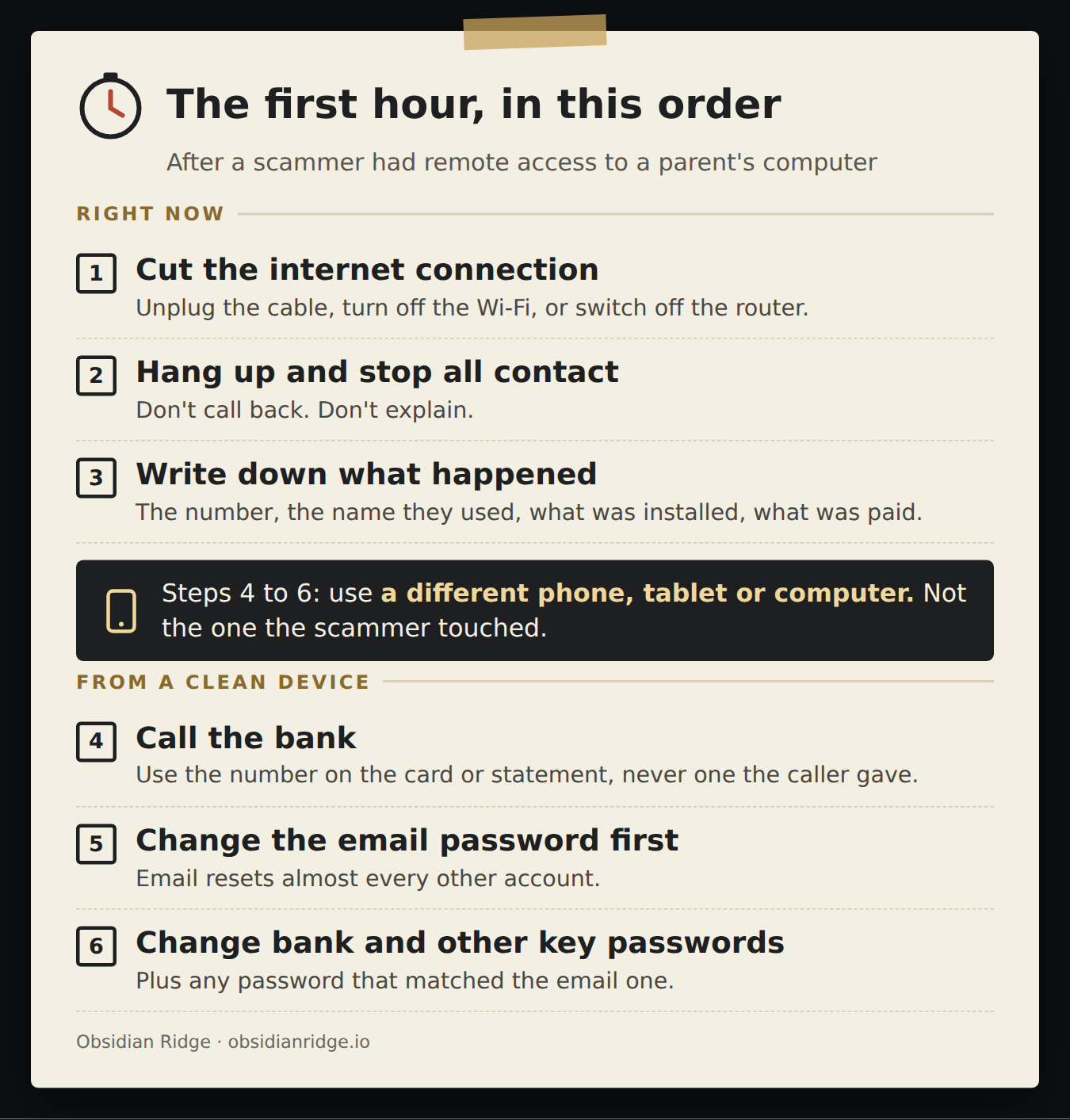
1. Cut the internet connection.
Unplug the Ethernet cable. Or turn off the Wi-Fi. Or turn off the home router if you are acting from a distance. Do this now, while the caller may still be connected. While they are connected, they can see the screen and reach files.
2. Hang up and stop all contact.
Hang up. Stop replying to texts or chats. Do not call back.
If they call again, do not explain. An explanation gives them another chance to pressure your parent.
A real company will not mind if you hang up and call back on a number you already have.
3. Write down what happened.
Do this before the details blur. Write:
This record helps the bank, law enforcement, and whoever cleans up the computer.
4. Call the bank. Use the number on the card or statement.
Do not use any number the scammer gave or left on screen. Tell the bank: "A tech-support scammer had remote access to the computer. Banking information may have been visible."
Ask about card replacement, transaction disputes, account monitoring, and whether any recent transfers can be reversed. If your parent logged into the bank while the caller was connected, tell the bank that specifically.
One technique CISA described in a 2023 advisory on remote-access scams: after connecting, a caller gets a person to log into their bank account. The caller then alters the account display on screen to make it look as if the bank has sent a large refund. They ask the person to send back the extra — but the money sent is the person's own. If your parent sent money this way, tell the bank right away.
5. Change the email password from a clean device.
Email controls account recovery for almost everything else. Use a phone, tablet, or a different computer — not the one the scammer touched.
Change the email password. Turn on two-step verification if it is not already on. Check recovery settings: backup phone numbers, recovery email addresses, and any apps connected to the account. If your parent logged into email while the scammer was watching, treat that password as already known to the caller.
6. Change passwords for financial and identity accounts.
Still from the clean device, change passwords for:
Also change any password that was the same as the email password.
Once the urgent steps are done, check these four things.
Email settings. Look for forwarding rules that were not there before, changed recovery contacts, and unfamiliar apps that have access to the account.
Installed software. Look for remote-access programs that were added during the session, such as AnyDesk, TeamViewer or ScreenConnect. These are real tools that scammers misuse. Uninstall anything that was added that day. Then run the security software already on the computer. Do not download a "cleaner" from any link sent after the scam.
Whether to rebuild the computer. A full wipe is not always necessary. Consider it if the scammer had administrator access, if files were downloaded or commands were run, if security settings were changed, if the computer is used for business or regulated data, or if the family cannot tell what changed. Write down what happened before wiping anything.
Whether a second call comes. After one scam, more calls may follow. They might say: "We can refund your money," "We are the fraud department," or "The first person was fake — I am the real one." Treat every follow-up as suspicious. Verify it through a number you already have, not one the caller gives you.
Report the scam at ic3.gov, the FBI's Internet Crime Complaint Center. In 2025, the FBI recorded more than 21,000 tech and customer support scam complaints from people aged 60 and over, with more than $1 billion in reported losses. Reports help agencies identify patterns and warn others.
You can also file a report at ReportFraud.ftc.gov.
These scammers are practiced. The calls are built to create fear and urgency, and to move faster than a person can think. Your parent is not unusual for being affected.
Do not lead with "How could you fall for that?" Lead with: "I'm glad you told me. Let's protect the accounts first."
Then ask neutral questions to build a timeline:
You are gathering facts, not prosecuting a family member. Shame makes people slower to tell anyone, and the bank needs to hear quickly.
Once things are calm, print the fridge card together and write your number on it.
Ridge Watch is managed monitoring for individuals' and families' computers. A 24/7 security operations centre reviews every alert. When they act on one, they may remediate it, note it, or take the computer offline to contain the problem. Taking a computer offline is one of those three outcomes, not what happens every time. A contained computer stays offline until we review it, within one business day.
Ridge Watch works on Windows and Mac computers.
On Windows Pro computers, Ridge Watch can also block remote-control programs nobody approved. Windows Home is not supported.
Ridge Watch cannot stop a phone call, or someone being talked into making a payment — by gift card, wire transfer, crypto, or logging into the bank for a "refund." On a computer without blocking, a remote-access tool a person lets in on purpose may not look like a threat; CISA notes that these tools generally do not trigger antivirus. Ridge Watch also does not cover phones or tablets.
For plans and prices, visit Ridge Watch.
Last updated
September 28, 2026. We refresh this content as the threat landscape and tools evolve.
FAQ
Disconnect the computer from the internet right away. Stop talking to the scammer. Then change important passwords from a different, clean device. Start with the email account, then banking.
Cut the internet connection first. You can turn the computer off after that. If there may be a legal, financial, or insurance investigation, get professional help before wiping or resetting it.
Change the email password first. Email is used to reset every other account. Then change banking, Apple or Google, Microsoft, any password manager, health portals, and accounts where the same password was reused.
Yes, if banking, payment, or identity information was visible or shared. Use the number on the card or the bank's app, not any number the scammer gave. Tell them a tech-support scammer had remote access to the computer.
Not as the first step. Disconnect, protect the accounts, and remove the remote-access software first. A full wipe makes more sense if the scammer had admin access, downloaded files, or if you cannot tell what changed. Preserve evidence before wiping.
Related reading
AnyDesk, TeamViewer, and ScreenConnect are real tools scammers misuse. Learn how the refund scam works, warning signs, and how to protect your family.
Read articleA plain-English guide to the scams hitting older adults hardest in 2026, and the single response rule that prevents most of the losses.
Read articleA practical guide for adult children who want to reduce scam risk for aging parents without treating them like children or burying them in security advice.
Read article