Email Security for SMBs in 2026: Gateway vs API vs Built-In (Defender)
Plain-English 2026 buyer guide to the three email-security architectures small businesses actually pick between: built-in Defender or Google Workspace.
Read article Obsidian Ridge
Threat Intelligence & Incident Response
Fake LIQUID alerts about a Moscow sync send users to ngrave.support to steal seed phrases. How to spot it, what to do, and whether ZERO is safe.
Short answer: On October 17, 2026, NGRAVE warned that attackers had hijacked the push notification system of its LIQUID wallet app and were using it to send fake security alerts. The fake alerts claim your portfolio synced on a Google Pixel 9 in Moscow, and the ones we reviewed led to ngrave.support. That is not NGRAVE's website. NGRAVE's site is ngrave.io and its help center is support.ngrave.io. Don't tap the alert, and never type your recovery phrase (seed phrase) or Perfect Key into any website.
NGRAVE emailed customers on October 17, 2026 under the subject "URGENT: Fake LIQUID notifications. Don't click." The email says the push notification system of its LIQUID app has been hijacked and that attackers are using it to send fake security alerts to LIQUID users. The alerts looked like they came from LIQUID because they did come through LIQUID's own notification channel, with the app's name and icon. LIQUID added push notifications in a May 2026 update, according to its App Store release notes.
The screenshots we reviewed show the alert reached people in two ways:
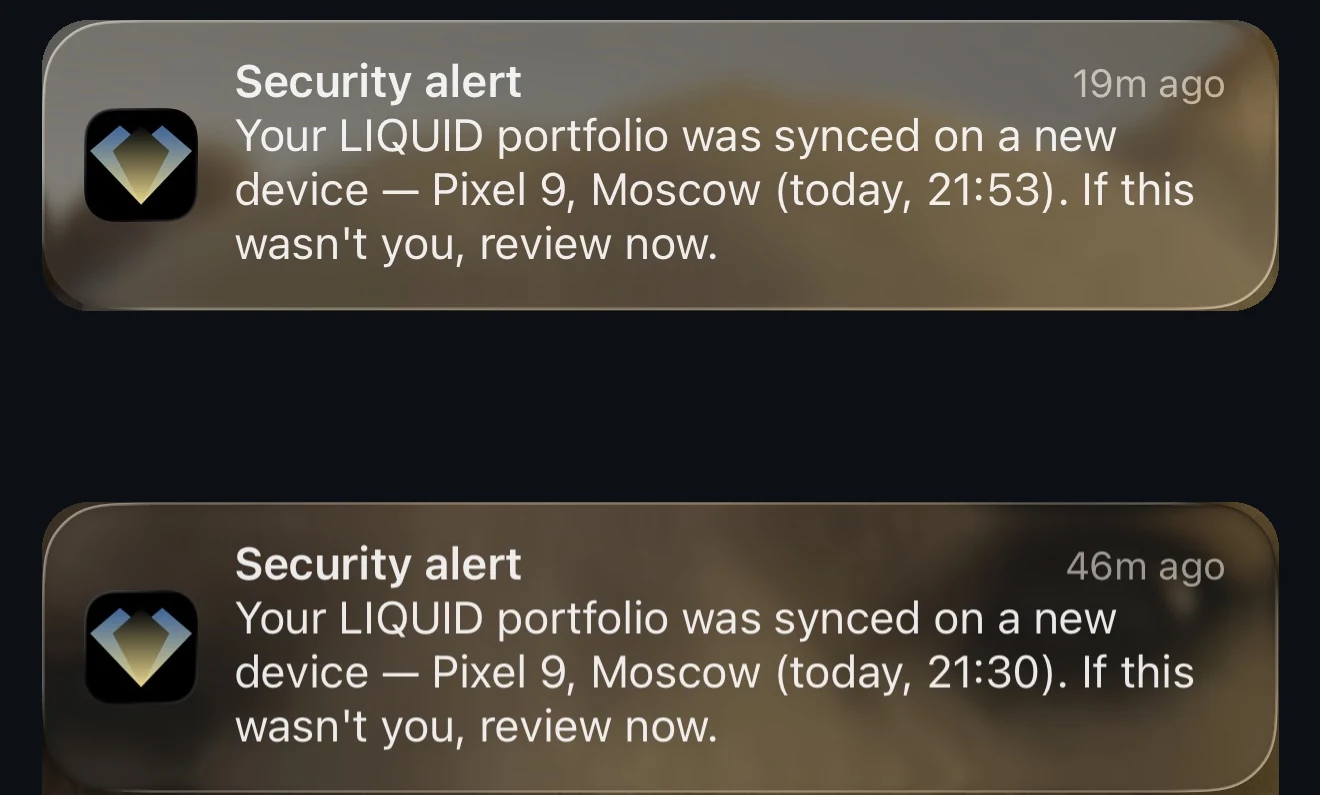
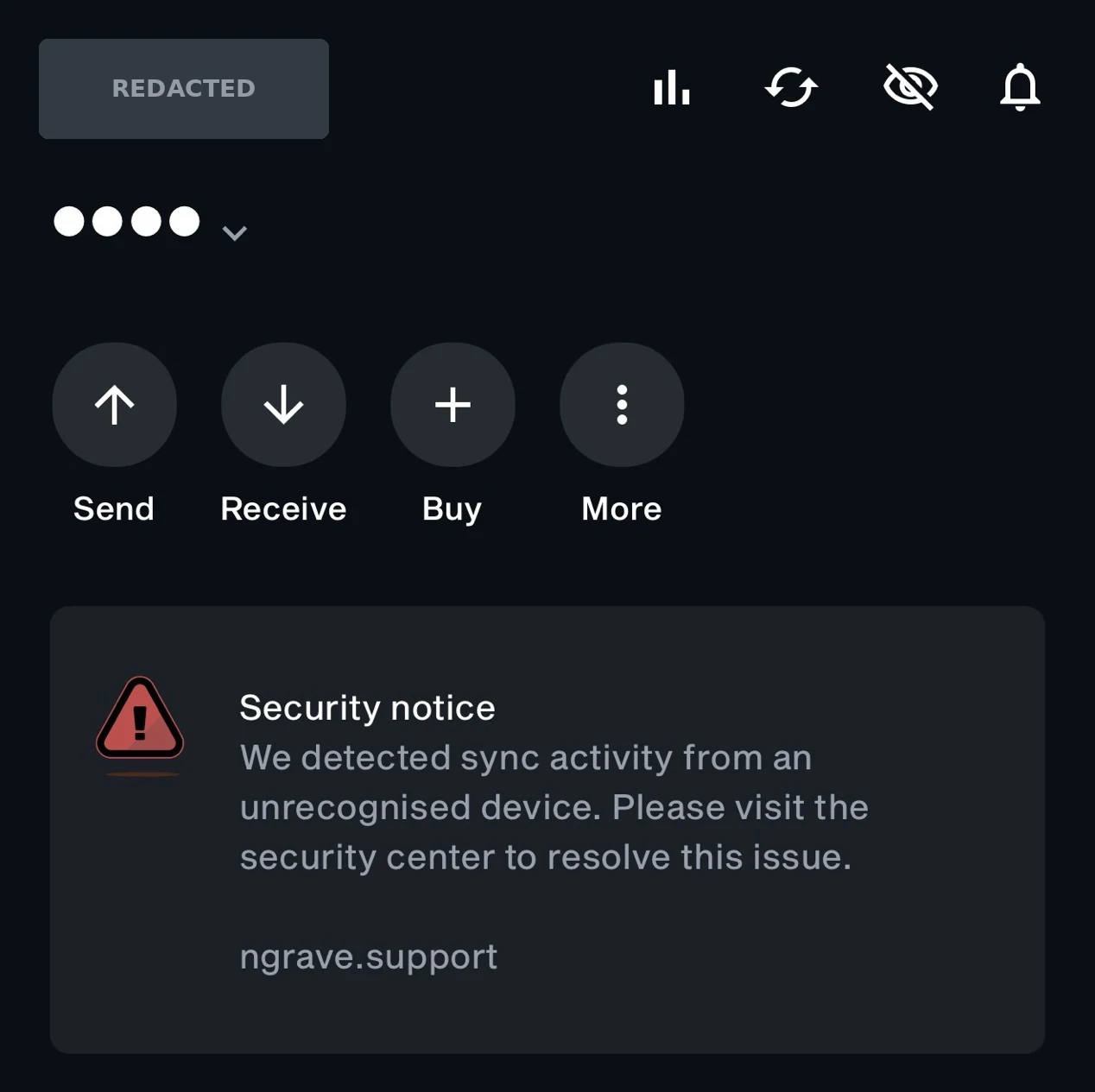
Turning off push notifications stops the alerts on your lock screen, but it does not remove a banner inside the app. NGRAVE's email doesn't mention the banner, but it does tell customers not to click any links in the LIQUID app until it confirms the issue is resolved.
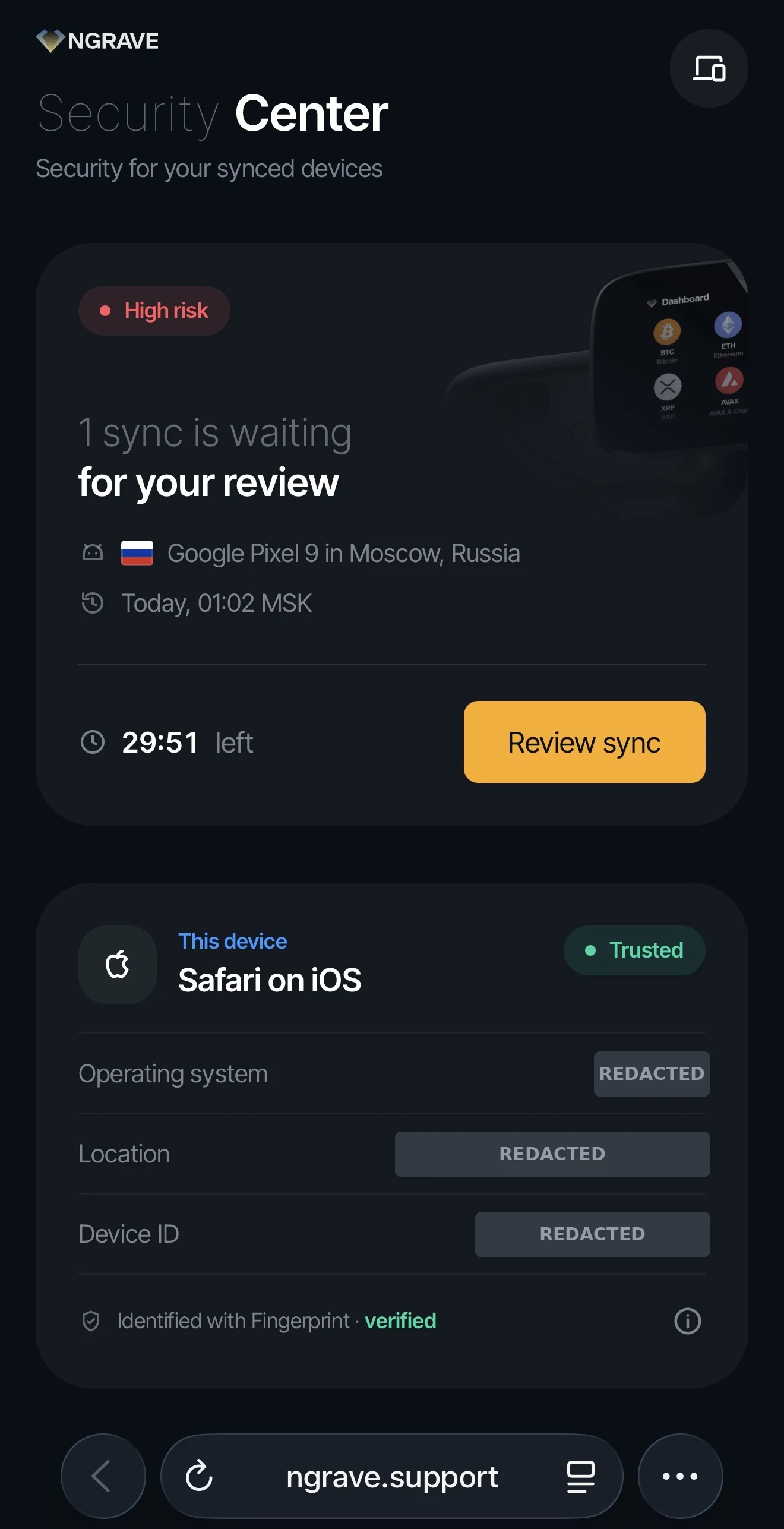
The fake site is a page called "Security Center" at ngrave.support. It shows a red "High risk" label, says "1 sync is waiting for your review" from a Google Pixel 9 in Moscow, and runs a 30-minute countdown beside a yellow "Review sync" button. Below that, it lists the visitor's own phone as "Trusted," with its operating system, city and a device ID.
NGRAVE's email says the alert leads to a phishing website built to steal your seed phrase. The email doesn't name the site. The address and page details here come from the screenshots we reviewed. Our screenshots stop at this screen, and you shouldn't go any further either.
Nothing made public so far shows the ZERO was breached. NGRAVE's email says private keys never leave the ZERO, and NGRAVE's App Store listing says LIQUID only receives public information from it, such as addresses. Based on that design as NGRAVE describes it, a hijacked notification system can show you a false message but has no direct route to keys stored on the ZERO.
Your funds are at risk if you type your secret into the fake site. With your 24 words or your Perfect Key, an attacker can rebuild your wallet on their own device and move your funds, and the hardware can't stop that. NGRAVE's Perfect Key is a 64-character form of the same 24-word secret, so protect both the same way.
A fake alert also doesn't prove the attackers know your addresses or balances. What data, if any, they could see has not been made public.
Find the line that matches you.
You saw the alert and did nothing. NGRAVE's email says your assets are safe if you didn't open the link and didn't enter your seed phrase. Turn off LIQUID notifications until NGRAVE gives the all-clear, and don't tap links in the app in the meantime.
You opened ngrave.support but typed nothing. Close the page, and don't download, install or approve anything it offers. Typing your seed phrase or Perfect Key is what hands an attacker your wallet. NGRAVE's email doesn't cover this case directly, so if you're unsure what you entered, contact support@ngrave.io.
You typed your seed phrase or Perfect Key. NGRAVE says to assume it is compromised. Move fast, because anyone with your phrase can move funds as soon as they have it.
Menu names vary by phone. LIQUID also has notification choices in its own settings.
NGRAVE warns that scammers reply to its posts or send direct messages pretending to be NGRAVE support, and says it will never message you first. It lists three places for real updates, including the all-clear: @ngrave_official on X, the #announcements channel on NGRAVE's official Discord, and email from support@ngrave.io.
Most phishing training teaches people to check who sent a message. That advice fails when the sender is real: this alert came from the right app, with the right name and icon, and only the request gave it away.
On an iPhone, a notification that carries an app's name and icon can only come from the app itself or from someone holding that app's push credentials, either the app maker or a service that sends notifications for it. An alert like this one means someone got control of a real sending channel. The same can happen with tools your team trusts every day, such as a chat app, a help-desk system, an e-signature service or a bank's app.
So teach one rule: check what the message wants you to do, not just who sent it. If it asks you to enter a secret, approve a sign-in, install something or move money, confirm it another way first. Check it through a channel you already know and didn't get from the message, such as a phone number from your own records or the company's website typed in by hand. In this incident the app itself was the compromised channel.
NGRAVE's warning email is a useful model for the other side of an incident. It quoted the fake alert word for word, told customers which channel to stop trusting, named the only three places it would post updates, and stated that it contained no links apart from its Discord invite and the unsubscribe link.
If your company sends notifications to customers, that channel needs its own guardrails:
At Obsidian Ridge, we build security awareness training and threat detection around how attacks reach people today, including through apps and services they already use.
| Indicator | Value |
|---|---|
| Phishing domain | ngrave[.]support |
| Official NGRAVE domains | ngrave.io, support.ngrave.io |
| Push notification title | Security alert |
| Push notification lure | LIQUID portfolio synced on a new device, Pixel 9, Moscow, "review now" |
| In-app banner title | Security notice |
| Landing page | "Security Center," "1 sync is waiting for your review," 30-minute countdown, "Review sync" button |
| Target | Seed phrase (24 words) or NGRAVE Perfect Key |
| Delivery | LIQUID's own push notification system, which NGRAVE says was hijacked |
| Date observed | October 17, 2026 |
This article is based on NGRAVE's email to customers on October 17, 2026, and on screenshots of the alerts captured the same day, with personal details removed. In its October 17 email, NGRAVE said it was working to resolve the issue. How the attackers reached LIQUID's notification system, and how many people received the alert, has not been made public. NGRAVE will post updates and the all-clear on @ngrave_official on X, its official Discord and by email from support@ngrave.io. We will update this page when NGRAVE shares more.
Talk with us about protecting your business from phishing through trusted apps and services.
Last updated
October 18, 2026. We refresh this content as the threat landscape and tools evolve.
FAQ
No. NGRAVE's October 17, 2026 email says the LIQUID push notification system was hijacked and that the "synced on a new device, Pixel 9, Moscow" alert is fake and leads to a phishing site built to steal seed phrases. In the alerts we reviewed, that site was ngrave.support.
No. NGRAVE's website is ngrave.io and its help center is support.ngrave.io. ngrave.support is a separate address that copies NGRAVE's look.
Nothing made public so far shows it was. NGRAVE says private keys never leave the ZERO. Your funds are at risk if you typed your seed phrase or Perfect Key into the fake site.
Typing your seed phrase or Perfect Key is what hands an attacker your wallet, so close the page and don't download, install or approve anything it offers.
NGRAVE's email says assets are safe for anyone who didn't open the link and didn't enter a seed phrase; if you opened it and aren't sure what you entered, contact support@ngrave.io.
Assume it is compromised, as NGRAVE advises. Create a new wallet with a new seed phrase, move all funds to it right away, and contact support@ngrave.io. In the United States, also report it to the FBI at ic3.gov.
Yes. NGRAVE asks customers to turn off LIQUID notifications in their phone settings until it sends an all-clear, and not to tap links in the LIQUID app or on social media in the meantime.
Related reading
Plain-English 2026 buyer guide to the three email-security architectures small businesses actually pick between: built-in Defender or Google Workspace.
Read articleA plain-English guide to spotting phishing emails and texts fast, what the common red flags actually look like.
Read articleA plain-English small-business email security guide focused on the cheap controls that cut business email compromise and phishing risk first.
Read article