
Multi-location DSO M365 consolidation: a four-quarter security program walkthrough
A scenario walkthrough of a DSO with multiple M365 tenants and no central detection, brought to consolidated identity coverage in four quarters.
Read articleSmall Business Security
DMARC in plain English for dental offices: what it does, why most local practices we checked don't have it, and how to add it without breaking reminders.
Suppose someone sends your patients an email from your practice's own address, says their balance is past due and links to a payment page they control. Will Gmail deliver it?
Gmail's spam filter might catch it. But for most dental offices around here, nothing in the practice's own settings tells Gmail to refuse it. The setting that would is called DMARC. It's free, and it lives in your domain's DNS next to your website records.
The From line on an email proves nothing by itself. Anyone can type your address into it, the same way anyone can write your return address on an envelope.
Three public records on your domain let the receiving mail system check whether a message really came from you:
On their own, SPF and DKIM aren't tied to the From address your patients see. DMARC ties them to it, and it's the part where you tell the receiver what to do with a forgery. In CISA's words, DMARC "removes guesswork from the receiver's handling of failed emails."
A DMARC record contains a policy, written as p=. There are three:
| Setting | What it asks Gmail, Outlook and others to do with a forged message |
|---|---|
p=none | Take no action. Deliver or filter as they normally would, and send the practice a report if the record asks for one. |
p=quarantine | Treat it as suspicious, which usually means the spam folder. |
p=reject | Refuse it. |
p=none is a monitoring setting. It's the right place to start and a poor place to stay, because a forged email is handled essentially as if you had no record at all.
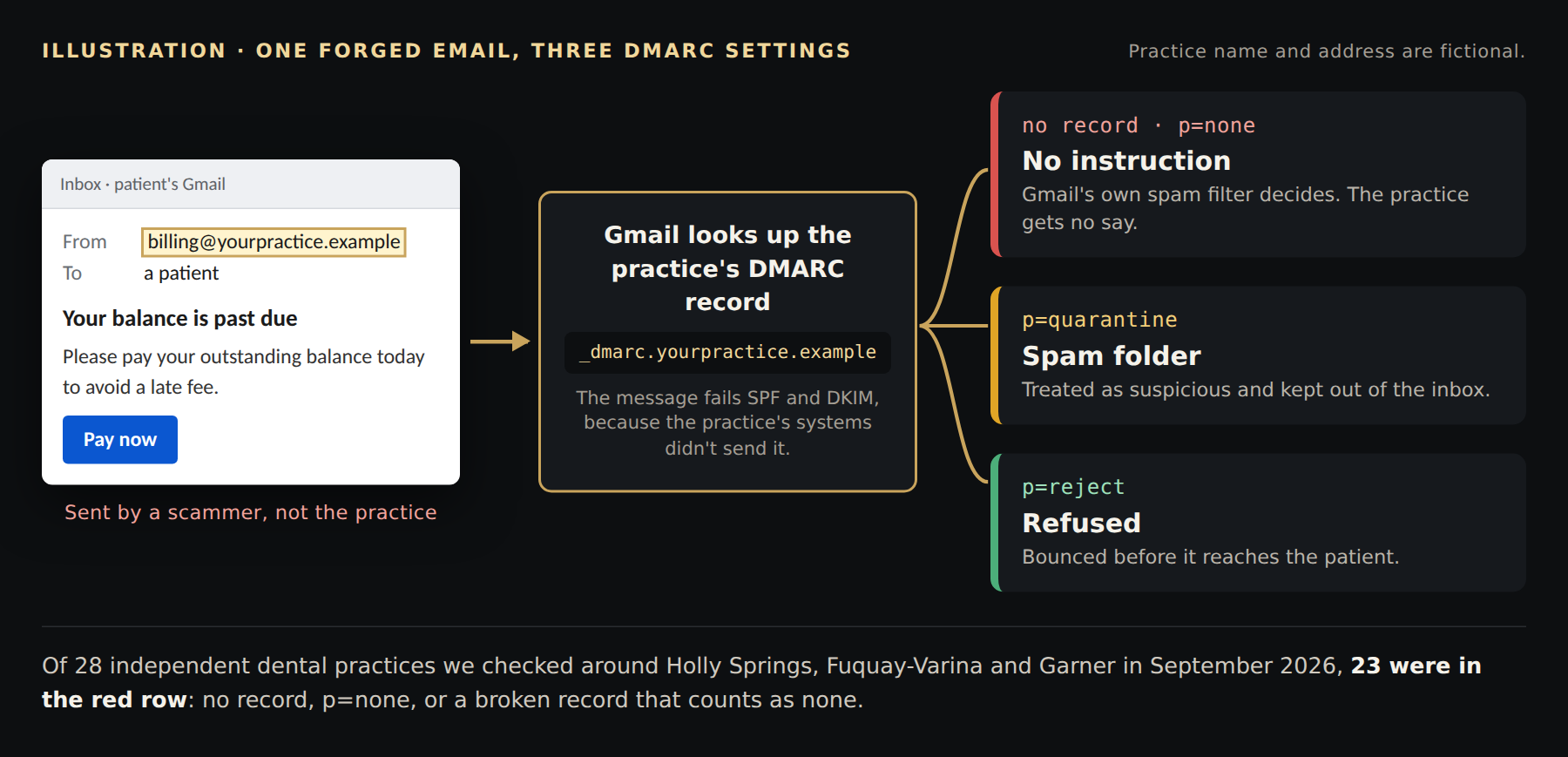
The same forged email under each setting. The From address is fictional.
In late September 2026 we looked up the public DMARC records of 28 independent dental practices in Holly Springs, Fuquay-Varina, Apex, Garner and Angier. These records are public by design, so anyone can do the same lookup.
p=none.That's 23 of 28 practices giving receivers no instruction to stop an email forged with their address.
Your patients trust email from you. A "your balance is past due" or "please update your insurance information" message from your real address is far more convincing than the same message from a stranger's Gmail account.
The same goes for everyone else you email: your lab, your billing company, your accountant, your landlord. A forged request that appears to come from your office can reach any of them.
Two things worth knowing, so you can weigh it honestly:
Either way, what it does is narrow and worth doing: it stops email forged with your exact address, and it costs nothing.
Our breakdown of four business email compromise emails shows how these play out.
Writing the record takes a few minutes. The care goes into not blocking your own legitimate email.
Most practices send email from more than one place: the Microsoft 365 or Google mailbox, plus an appointment-reminder or recall system, a review-request tool, an online payment service, maybe a newsletter. Each of those has to send in a way that lines up with your domain before you move past p=none. For most of these tools that means turning on DKIM signing for your domain in the tool's settings, often labeled "domain authentication" or "custom sending domain." Adding the tool to SPF alone often isn't enough, because many send with their own return address behind the scenes. Skip this step and their messages start landing in spam or bouncing.
p=none with an address for reports. Receivers typically send reports once a day.p=quarantine, then p=reject, once the reports show only your own services. CISA recommends the same order: none, then quarantine, then reject.The change is made wherever your domain's DNS is managed. For many practices that's the website company or a registrar account, such as GoDaddy, that someone set up years ago. Finding that login is often the slowest part.
We'll look up your practice's email records at no charge and tell you what's missing and in what order to fix it. If you have an IT person, we're happy to walk them through it. Get in touch, or see how we handle email security and dental practices in general.
Sources: CISA, DMARC fact sheet; RFC 7489, sections 6.3 and 6.6.3; HHS 405(d), HICP Technical Volume 1; Tokio Marine HCC, e-MD / MEDEFENSE Plus application, question 7.c; local lookups by Obsidian Ridge, September 2026.
Last updated
September 30, 2026. We refresh this content as the threat landscape and tools evolve.
FAQ
No. The HIPAA Security Rule doesn't name DMARC, and the HHS 405(d) cybersecurity guide for small healthcare organizations doesn't name it in its recommendations either. It's a free DNS setting that tells Gmail, Outlook and other mail systems to stop email forged with your practice's exact address.
It can, if you go straight to p=reject before your reminder system, review tool and payment service are set up to send for your domain. Start at p=none, use the reports to find every service that sends as you, fix those, then move to quarantine and reject.
p=none asks receivers to take no action and just send you reports. p=quarantine asks them to treat a forged message as suspicious, which usually means the spam folder. p=reject asks them to refuse it.
Type your domain, the part of your email address after the @, into a free DMARC lookup such as MxToolbox. If it finds no record, or a record with p=none, forged email with your address is not being stopped. If it reports more than one record, receivers ignore all of them.
No. It stops email forged with your exact domain. It does nothing about lookalike domains, a staff mailbox that has been broken into, or a scammer who puts your practice's name in front of a Gmail address.
Multi-factor authentication, staff training and a phone-call rule for payment changes are the defenses for those.
Related reading
A scenario walkthrough of a DSO with multiple M365 tenants and no central detection, brought to consolidated identity coverage in four quarters.
Read articleA scenario walkthrough of an adversary-in-the-middle phish on a dental practice, an inbox rule staged for wire fraud, and the ITDR chain that broke it.
Read articleWhat dental cyber insurance actually covers in 2026, the underwriting questionnaire controls carriers review.
Read article